The gear that guards your peace
In my last article, we looked at the uncomfortable math of the constant hustle. We discovered that for every hour of real work, we often pay an extra hour in context-switching tax and attention residue.
If you’re a solo founder or a deep-thinking professional, your tool stack is either a leak or a shield. Most productivity apps are actually attention leaks — they want more of your time, more notifications, and more of your data.
To build a Soft Hustle, we need a different kind of gear. We need tools that that get out of the way the moment the job is done. Here is my minimalist stack for 2026.
Disclaimer: this article may contain affiliate links.
1. Noise reduction: the digital bouncer
The tools: Freedom.to and a productive browser.
In recent years, a new category of “productive browsers” has emerged, aligned perfectly with the Soft Hustle philosophy. The heavy hitters in 2026 are Arc Browser, Dia Browser, Zen Browser, and Vivaldi. While Arc is entering its twilight years, its successor Dia is pushing AI-guided browsing on Mac, while Zen (Firefox-based) and Vivaldi (Chromium-based) offer robust, cross-platform stability for the rest of us.
- The Soft Hustle angle: Freedom.to doesn’t ask you to change your workflow; it simply enforces your boundaries. It blocks the “dopamine loops” (YouTube, LinkedIn, News) across all your devices simultaneously.
- Why productive browsers work: Traditional browsers (like Chrome or Safari) treat tabs like a messy horizontal pile of papers on a desk. Productive browsers move the tab bar into a vertical sidebar and introduce three specific UI shifts that protect your focus:
- Workspaces (context isolation): They allow you to separate Work, Research, and Admin into siloed containers. When you are in your Writing workspace, you physically cannot see your Invoicing tabs. This eliminates the visual triggers that cause the “Oh, I should check that” impulse.
- Split-view tiling: Instead of flipping back and forth between two tabs (a major cause of context-switching tax), these browsers let you lock two pages side-by-side. This allows you to reference your research while writing your draft in a single, stable view.
- The “glance” vs. “open” distinction: Features like Zen’s “Glance” or Vivaldi’s “Web Panels” let you peek at a page (like a calendar or a chat) without fully switching your mental context. You check the data, the windo disappears, and you remain in your primary task.
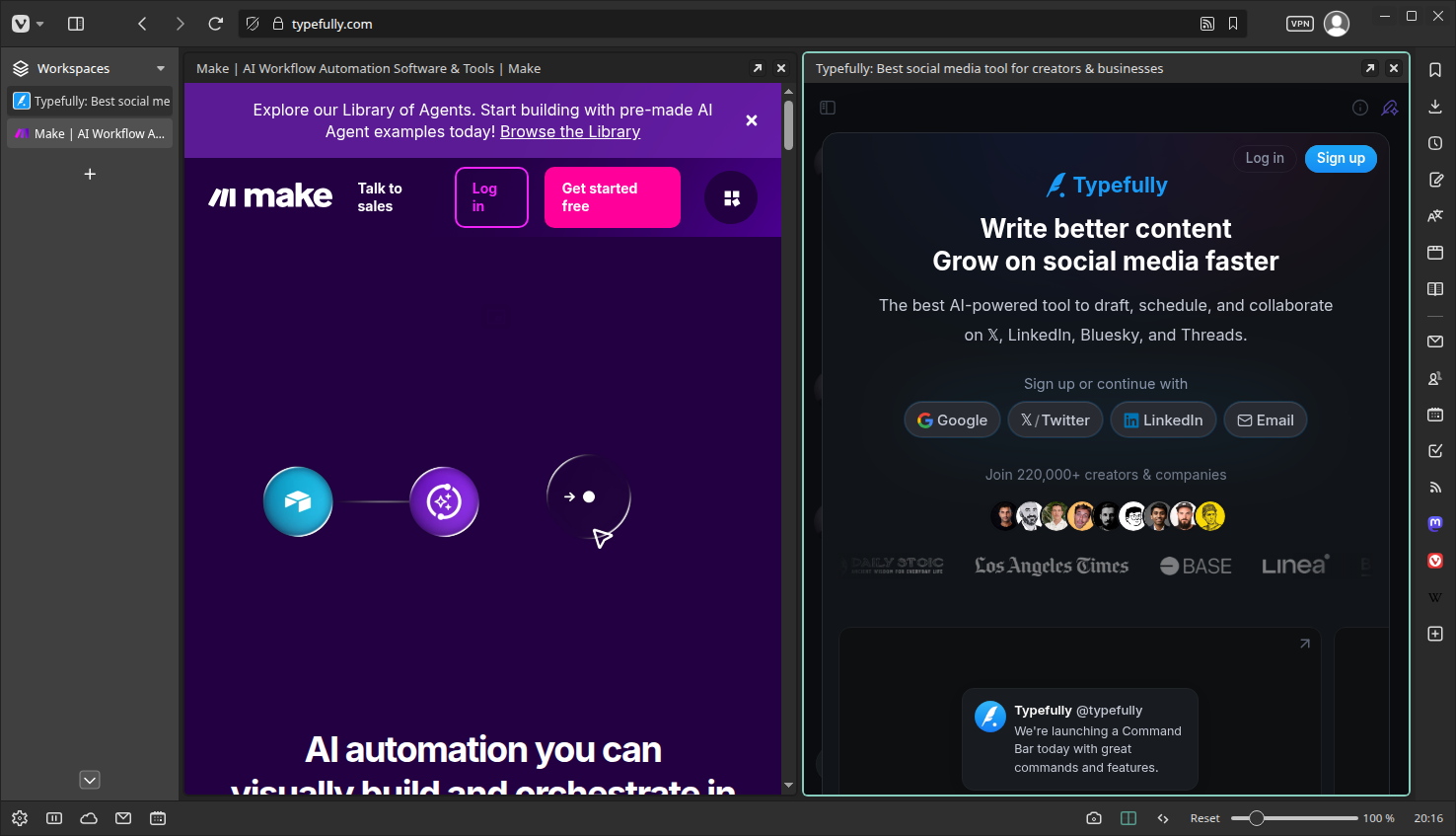
- The result: You stop relying on willpower and start relying on architecture. By using a browser that organizes information spatially, you reduce the procedural clutter your brain has to manage just to stay on task.
2. Delegation: the silent employee
The tool: Make.com
If you’ve read my guide on building a semantic triage system, you know I love N8N for privacy. But in recent months, I’ve become positively impressed with Make.com, which is now the gold standard for low-code automation because it requires no technical knowledge, has affordable plans and a generous free tier.
- The Soft Hustle angle: Automation shouldn’t cause you more work, but less deciding. You can let Make.com handle your metawork: moving invoices to folders, syncing calendar invites, or triaging emails while you sleep.
- The result: It reduces your metawork load (the 10% of your day spent organizing work rather than doing it).
3. Exit anchors: the ready-to-resume dump
The tool: Google Keep + Google Keep Chrome Extension, or Apple Notes, or Microsoft OneNote.

In my earlier article, we discussed the “ready-to-resume” plan: the 60-second status dump you do before switching tasks. For this to work, the dumping needs to have zero latency.
- The Soft Hustle angle: For those moments that I have a stray thought or need to park a task, I found that the least fancy solution works best. Manual notebooks are never conveniently at hand, and my handwriting can’t keep up with my thoughts. Notion and Obsidian trigger my organization brain, which is not useful when I am just trying to dump a thought. Google Keep does the two things I need: take notes, and sync them across devices.
- The result: Less attention residue. You clear the whiteboard of your mind instantly.
4. Friction reducers: the browser-only utilities
The tools: QuickBizCalculators.com and CreatorConvertTools.com
I built these because I was tired of SaaS bloat for simple tasks. I didn’t want to sign up for a subscription or hand over my email just to calculate a project’s net pay or clean up a mess of Markdown text.
- The Soft Hustle angle: Privacy-focused, browser-only tools for simple conversions or calculations that require no login yet let you stay in control of your data and get out of your way quickly.
- Use case: Use the Hourly Rate Calculator to find your Sustainable Rate (accounting for that 2-2.25x multiplier) before you send your next proposal.
5. Intentional writing: from chaos to clarity
The tool: Typefully (for short-form) or Obsidian + Copilot Plugin (for long-form)
Writing is the core of the Soft Hustle, but the environment matters.
- Typefully: If you share your work on social media, Typefully is a zen scheduler. It lets you write without the noise of the feed.
- Obsidian + Copilot: Since I am a developer, I spend most of my time in VSCode + Zencoder.ai, which I also often use for writing long form. But my favorite pick for a non-tech focused longform writing app is Obsidian. You can even add the Copilot for Obsidian plugin, which acts as a sounding board for your research.
- The result: You no longer get sucked into a random funnel while trying to post, and you move from reacting to deliberate publishing.
Conclusion: build for the low-energy day
The secret to a Calmer Tool Stack isn’t finding the most powerful tool. It’s finding the tool that requires the least amount of willpower to use.
When you’re at 100% energy, any tool works. But the Soft Hustle designs for the days when you’re at 40%. It’s about creating an environment that protects your momentum when you’re more tired or scattered than usual.
Next week, we’re moving away from the screen entirely. I’ll be sharing “The Sunday Reset” — 5 low-tech habits to ensure you start your week with a clean slate instead of a mounting debt.